

In short:
- New version: Citavi 7
- License financed for three years
- What is new?
- Also included: CItavi Web
- Recommendation
Citavi in the seventh version
Citavi has been available at the TUHH since 2008 and is actively and happily used by many. Now the license has been extended for another three years – in the new version 7, financed by the TUHH. You can find an overview of the development of reference management at the TUHH in our timeline.
Three-year continued licensing
In the recent past, there have been repeated discussions about whether Citavi should continue to be licensed at the TUHH. One of the main reasons for this discussion was the sale of the software to a US company and the associated concerns about future development and data protection. We addressed this topic and the considerations at the time in a blog post.
Popular program for literature management
This interest is particularly evident in Citavi’s diverse functions, which make it a popular program for literature management. Some universities have decided against Citavi, while others have opted for it – including the TUHH. Many users appreciate the program’s features, such as knowledge management, search functions within a project and support when creating citations. The results of our survey from November 2021 also confirm the clear interest of TU academics in Citavi. One limitation to date was that Citavi could only be used under Windows. This has changed with the introduction of the web version.
What’s new is described in the following section.
Version 7, what’s new?
In short: the version doesn’t bring too much that’s new…
Although the distributor Alfasoft speaks on its website of “important innovations for the research management platform with AI functions, improved export options and a new interface design […]”, the focus is primarily on the AI functions – and unfortunately these are not (yet) fully convincing.
Researching specialist articles
With Citavi, articles can now be found with AI support via Semantic Scholar – a service that already existed in a simplified form. Semantic Scholar is a free academic search engine that processes its search results using artificial intelligence. An interesting feature is that ratings and summaries can be created automatically from the PDFs found. In practice, however, the AI search sometimes failed to deliver any results, even for known titles and specific search terms.
Evaluation of sources
If a PDF is opened in the project, the key findings can be generated via “AI: Evaluate results” – a kind of summary, not a real evaluation. The function can be used, but delivered only partially convincing results in tests and should always be checked manually.

Fig. 1: Menu item “AI: Evaluate results” to generate the key findings of an article using AI
AI for summarizing PDFs
Selected sections of a PDF can be summarized and saved in the project. The AI usually takes the first sentence of the section as the “core statement”, which should be changed independently. Interesting side effect: A text in German is summarized in English. Is this always desirable?

Fig. 2: Form Summary of a text section by AI
Now also Citavi Web
New is the licensing of the web version of Citavi. This means that Apple and Linux users can now also work with Citavi using a browser. Project data is stored online, so that collaborative teamwork is also possible.
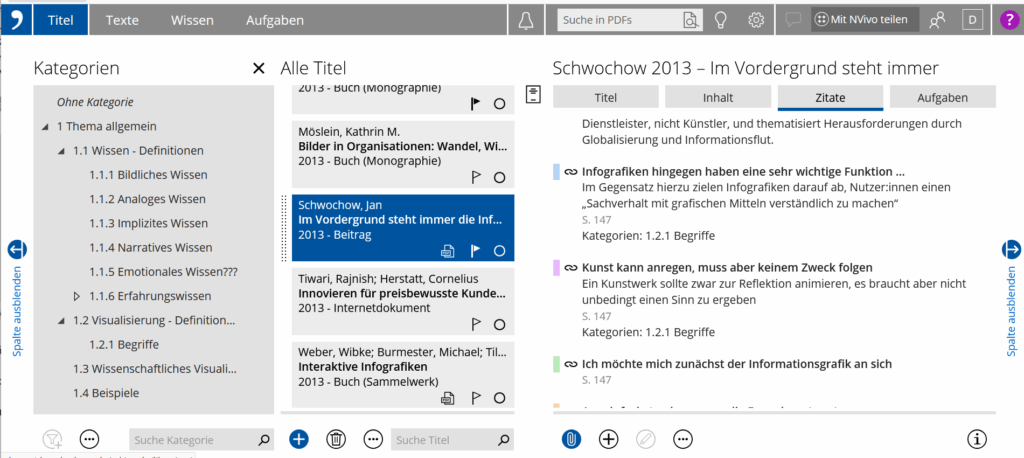
Fig. 3: Screenshot CItavi Web interface
The range of functions in Citavi Web is currently not quite as extensive as in the desktop version (see also Comparison of reference management software) – however, many important functions for reference management are available. To see for yourself: Just give it a try!
Our recommendation
We have been testing the new Citavi version for some time and everything has been working well. However, that doesn’t mean that something doesn’t work as expected – so as always, it’s best to try it out for yourself. You can of course continue to use version 6. It is generally advisable to regularly create a backup of your project data. If you install version 7, you should definitely create a local backup of your project beforehand.
Questions? We will be happy to advise you on reference management
Email: literaturverwaltung@tuhh.de.

Detlev Bieler
Telephone: +49 40 30601-3288

Florian Hagen
Telephone: +49 40 30601-3003

Alexander Unteutsch
Telephone: +49 40 30601-2855
You are also welcome to use our open online consultation hours via Zoom (identification code: 503035; meeting ID: 832 9724 8626) for questions regarding literature management (Fridays from 09:00 to 09:30).