In our „Database of the Month“ series, we regularly present research tools that support your academic work. This article focuses on Web of Science.
Contents
- Web of Science – What is it?
- The Web of Science interface
- Search: smart oder advanced
- Numerous filter options
- Search for researchers
- Hit analysis
- Conclusion
Web of Science – What is it?
The Web of Science (WoS) database is an interdisciplinary search interface for finding scientific literature from more than 21,000 academic journals, conference reports, and books. WoS contains over 90 million articles, which are selected on a 100% publisher-neutral basis. WoS is a paid service and is licensed by TUB. Some of the data dates back to 1900. The content is in English and searches are also conducted in English.
The hit list displays titles, abstracts, and keywords, but no full texts. However, links to open access full texts are provided; as of March 2026, there are over 13 million of these. WoS also provides references to related articles that cite the same literature.
WoS is one of the so-called citation databases. These are databases that, in addition to the articles listed in them, also display the sources used in them—the bibliography—as well as the articles that cite the one in question. On this basis, a forward and backward search can be performed: Which articles form the basis for the one in question and are cited, and who has cited the article after its publication?
By analyzing the relationships between citing and cited articles, metrics for the scientific significance of a journal, article, or author can also be calculated, such as the impact factor or the H-index.
The Web of Science interface
First, WoS offers a simple search bar for entering search terms, called Smart Search:

Easy access to search (image not under free license)
On the left-hand side, various icons offer additional functions such as setting notifications, displaying saved search lists (registration required), and opening the search history for the respective session. But first, let’s take a look at the search options.
Search: smart oder advanced
For a more self-determined and targeted search, we recommend using the Advanced Search right from the start. Incidentally, this corresponds to the start page that was displayed in the previous version until recently. You can search for documents and researchers. Various search fields can be selected for the search, such as All fields, Title, Topic, Publication title, etc.
Additional search rows can be added using the Add row button and then combined using Boolean operators.

Advanced search (image not under free license)
In the search string shown in Advanced Search, the terms “renewable energy” have been entered to simplify the start of a search. A search using these terms yields almost 200,000 hits:

Hit list with quick filters displayed for initial narrowing down (image not under free license)
In the screenshot, several filter options can be seen to the left of the first hit displayed, each with a preview of the content that will be displayed. Here, for example, there are 4,900 highly cited papers, almost 30,000 review articles, and 90,000 open access articles on the topic of renewable energy.
Numerous filter options
The major advantage of using a database for literature research over a search engine such as Google or, in the scientific field, Google Scholar, is that it provides specific filter options. This allows the number of hits during a search to be narrowed down or expanded, or even changed within a current search.
In addition to publication periods or the selection of specific subject areas (called Web of Science Categories) or languages or regions, filter options include affiliation, document types, publication titles, and many more. These are all filter options (except for time restrictions and language selection) that do not exist in Google Scholar.

Selection of filter options (image not under free license)
Restriction of the number of hits
A very effective filtering method for large hit lists is to narrow down the hit list by searching for keywords within the hits. Within the large number of hits on the topic of renewable energy, we will first narrow down the search to wave power. To do this, enter the terms wave power under Refine results.
After clicking on Refine, the original number of hits is reduced to a fraction, namely 3,774 documents. Then, since we are interested in tidal power, we narrow it down further to tides. This leaves 51 hits. A manageable number that is easier to review. After all, 34 of them are open access and eight documents are review articles, which can serve as a good overview.
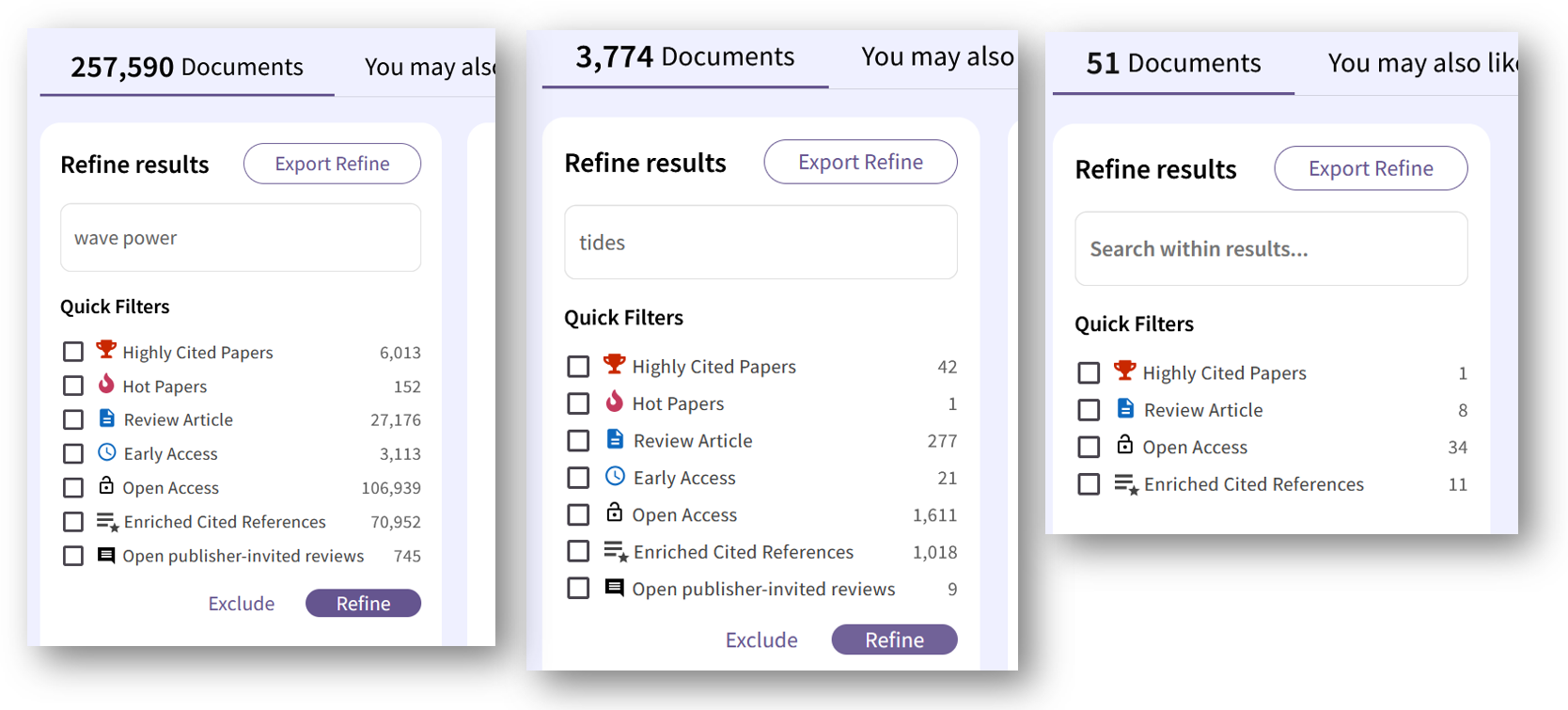
Multiple refinement of search results with Refine (image not under free license)
Another way to narrow down the number of hits by excluding certain terms is to use Boolean operators in the advanced search. In the example, all hits related to solar should be excluded. This is done using the NOT operator.

Combining multiple search queries with Boolean operators (image not under free license)
Query Builder, something for advanced users
An advanced search option is the query builder. Here, a search string can be compiled from a combination of different field abbreviations (in this example, ALL for All and OG for Organization) and search terms. This is particularly suitable for extensive searches, which can also be combined in a search string in this way, as can be seen in the excerpt from the further screenshot.

Query builder, list of possible field abbreviations (image not under free license)
Once the search has been sufficiently narrowed down, a more detailed examination can begin. To do this, the hits can be analyzed.
Hit analysis
Suppose you want to know::
- in which other research areas research is being conducted on your topic,
- which journals publish particularly extensively on your research topic,
- or you are looking for other researchers to collaborate with on a project?
Then you can use the Analyze Results button above the hit list to access various analysis options.

Button: Analyze results oberhalb der Treffer (Bild nicht unter freier Lizenz)
You can select various categories for this purpose, and a graphic will then clearly show you how many hits there are for each aspect.

Categories according to which hits can be analyzed (image not under free license)
This graphic shows the various areas of research in which wave power is being studied:

Hit analysis by subject area (image not under free license)
Search for researchers
Finally, Web of Science also allows you to search specifically for researchers. To do this, simply enter the name; if there are different spellings, WoS will automatically suggest variants.

Search mask for searching for researchers (image not under free license)
In addition to publications that can be accessed directly, the search results also display various key figures such as citation frequency and others.
Conclusion
If you want to be able to control your search for scientific papers in a variety of ways, Web of Science is the right choice for you. As a citation database, WoS also allows you to search forwards and backwards using cited and citing works. Finally, WoS also offers analysis of the search results.
The numerous filter options are a particular strength of this research database. Unlike internet search engines, the content at WoS is curated and selected independently of publishers. Hits are not displayed first according to commercial interests or based on obscure algorithms, but according to the search criteria selected by the searcher. A survey of researchers at the TUHH in 2023 on the question of re-licensing WoS revealed clear support. Arguments in favor included that some documents would not have been found using other databases, that the overlap with other databases was not as great as assumed, and that WoS was superior to other databases for thematic searches.
A similar and very well-known citation database is Scopus, which will be presented here next month.